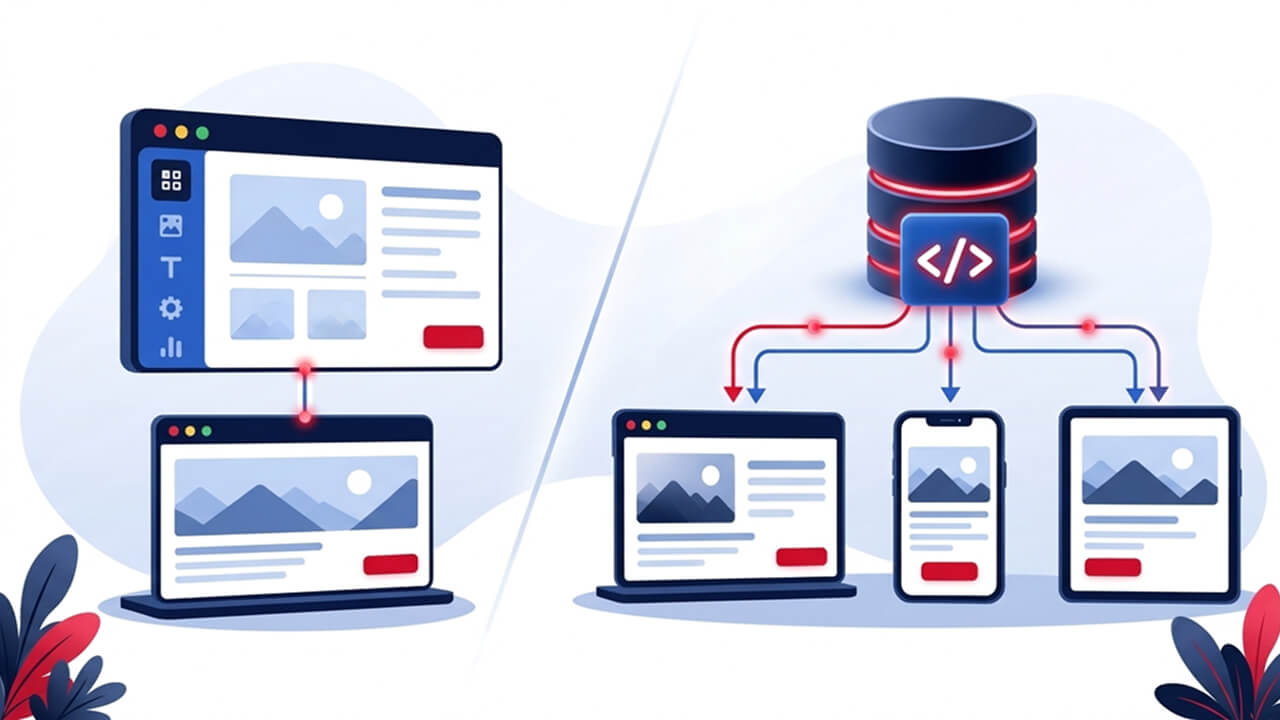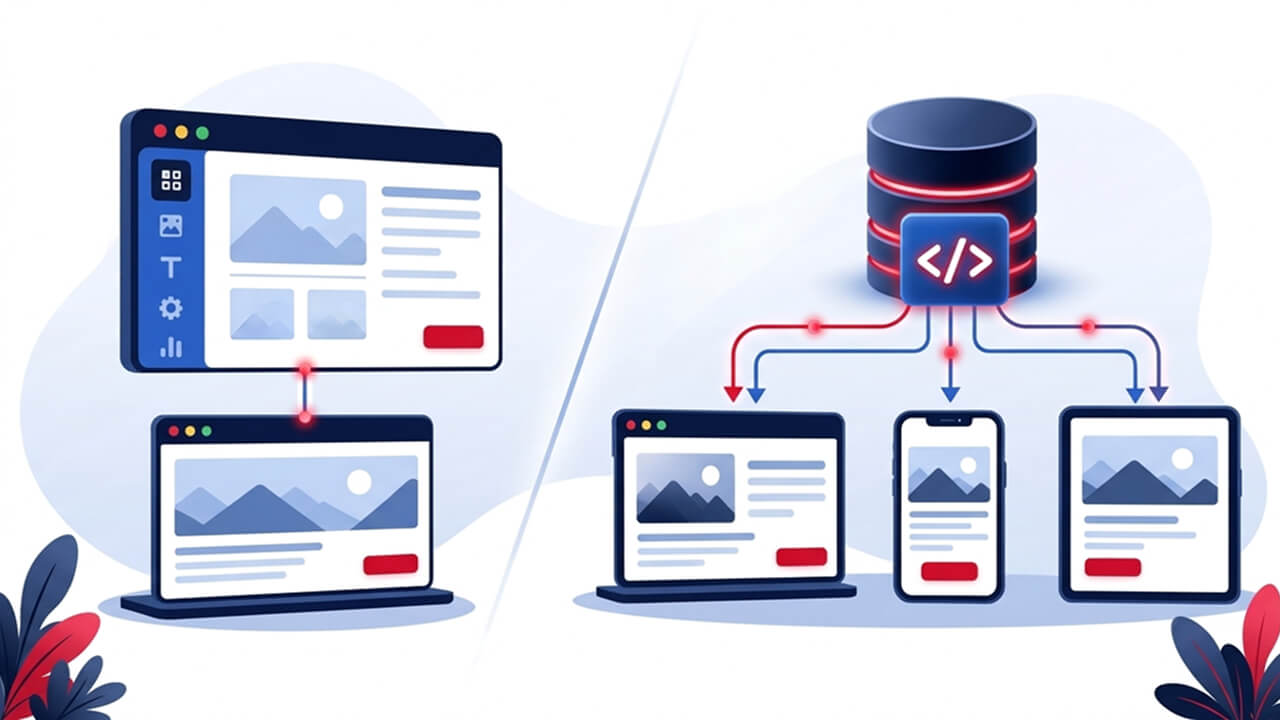
Choosing a content management system (CMS) is an important decision when developing a business website. It influences how easily teams can publish content, introduce new features, connect external applications and manage their digital presence as the business grows. Traditionally, many organisations have relied on platforms that combine content management and website presentation within one system. However, as websites become more interactive and businesses expand across multiple digital channels, headless CMS architecture has become another option worth considering. The difference between headless CMS and traditional CMS comes down to how content is managed and delivered. A traditional CMS generally handles both content and presentation, whereas a headless CMS separates these responsibilities and makes content available through APIs. Neither approach is automatically better. A business managing a straightforward corporate website may not need the additional complexity of a headless setup. An organisation developing multiple digital platforms may benefit from having greater control over its front-end technology.
In this guide, we explore how both approaches work, where React and Next.js fit into headless development, and what businesses should consider before choosing a CMS.
What Is a Traditional CMS?
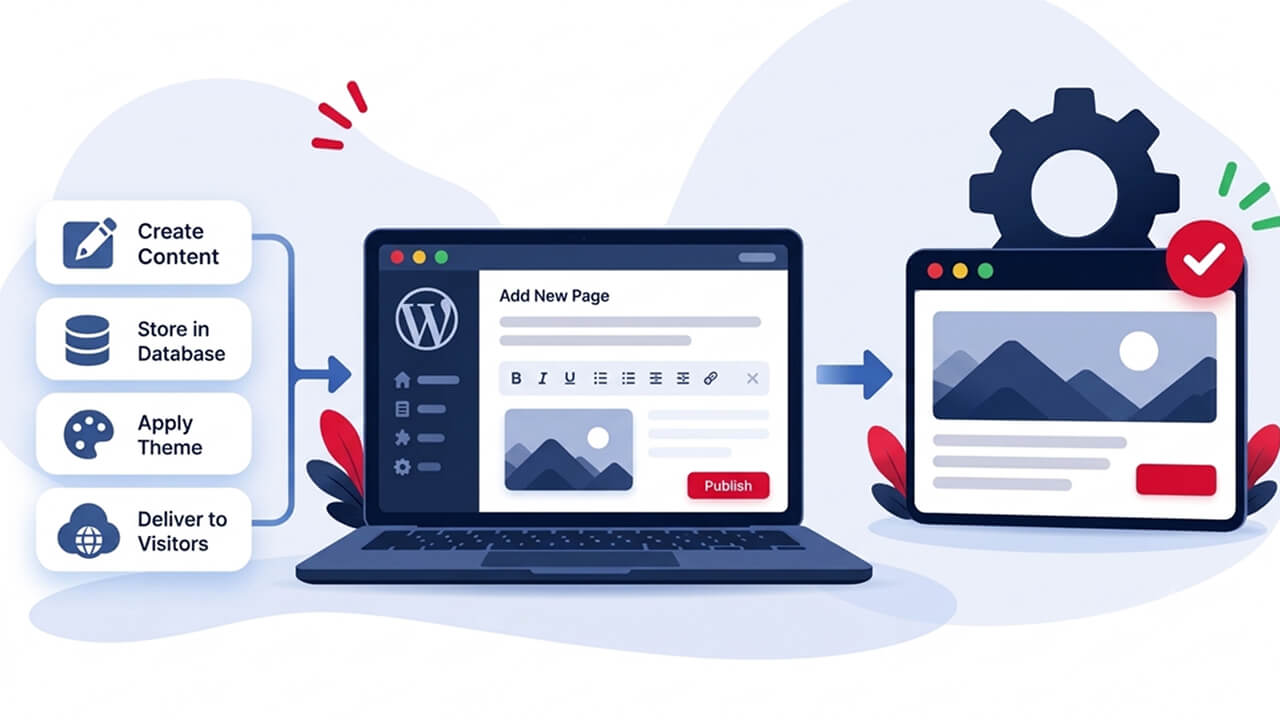
A traditional content management system combines the back end, where content is created and managed, with the front end, which displays that content to website visitors. Platforms such as WordPress and Drupal are commonly used for this approach. For example, when a marketing manager publishes a new service page, they can add the heading, text, images and other information through the CMS dashboard. The platform uses its themes or templates to display the content on the website. This integrated structure makes traditional CMS platforms relatively straightforward to manage.
How Does a Traditional CMS Work?
A typical publishing process involves four stages:
- Content creation: Editors create pages and articles through the administrative dashboard.
- Content storage: The CMS saves the information in its database.
- Template processing: The platform applies the selected theme or template.
- Content delivery: The completed page is delivered to the visitor's browser.
Advantages of Traditional CMS Platforms
- Simple content management: Marketing teams can update website content without involving developers for every change.
- Established publishing tools: Features such as media libraries, page editors, and user permissions are generally available.
- Lower development complexity: Existing themes and plugins can reduce the time needed to build conventional websites.
- Familiar workflows: Businesses can manage website content through a single administrative interface.
Limitations of Traditional CMS Platforms
Traditional CMS platforms can become more challenging when website requirements become complex. Extensive customisation may introduce plugin dependencies, compatibility issues and additional maintenance. Sharing content across multiple applications may also require separate integrations. These limitations do not make traditional CMS platforms unsuitable for larger websites. They simply mean that businesses should evaluate whether the existing architecture can support their requirements.
What Is a Headless CMS?
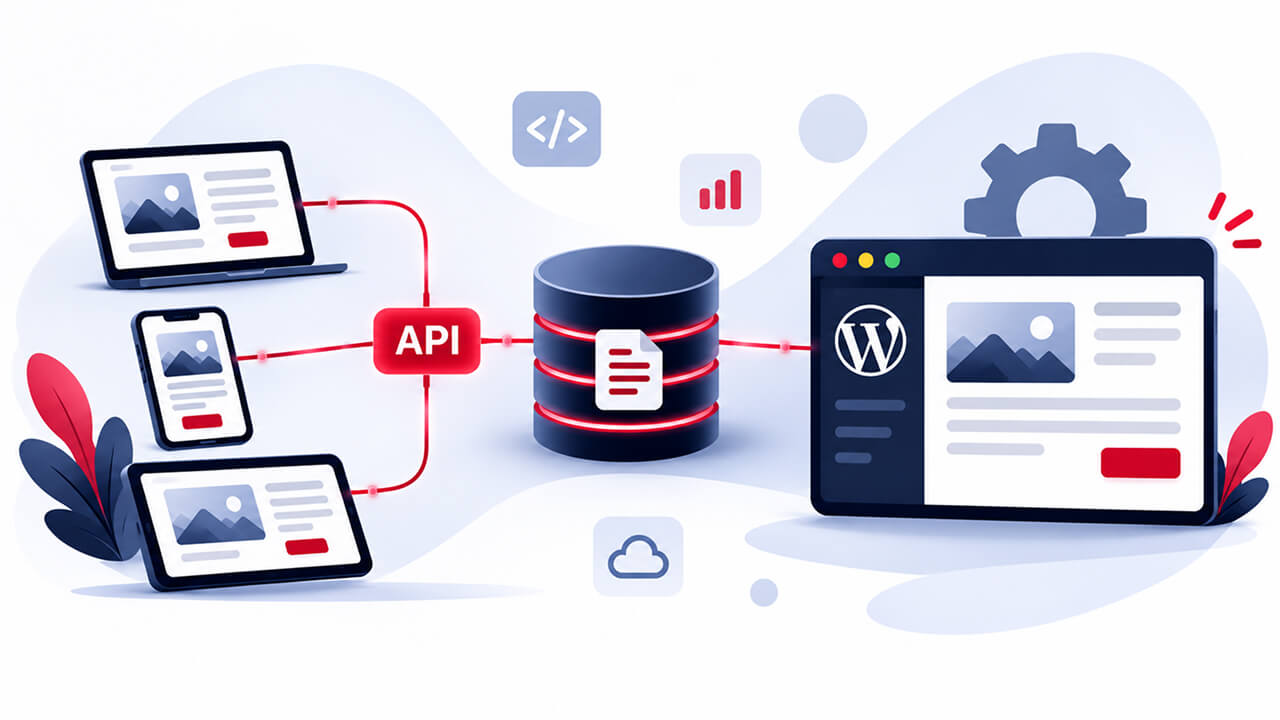
A headless CMS separates content management from the front-end presentation layer. Instead of generating complete website pages through its own templates, the CMS stores content and makes it available through APIs (Application Programming Interfaces). A separately developed application retrieves that information and decides how it should appear. For example, a business could manage its service descriptions and articles in one headless CMS. Its website might use React to display the information, while a mobile application retrieves the same content through an API. The content is managed centrally, but each application controls its own presentation.
How Does Headless CMS Architecture Work?
A typical headless architecture has three main components:
- Content management system: Editors create, organise and publish content through the CMS dashboard.
- API layer: The API connects the CMS with external applications. REST and GraphQL are commonly used approaches for retrieving structured content.
- Front-end application: The application retrieves the content and displays it using technologies such as React, Next.js or Vue.
This separation gives developers more freedom when building digital experiences. However, it also means the front end, API connections and publishing workflows need to be developed and maintained separately.
Advantages of Headless CMS
- Front-end flexibility: Developers can select technologies according to project requirements.
- Content reuse: Centrally managed content can be delivered to websites, mobile applications and other connected platforms.
- Custom development: Businesses can create interfaces without depending entirely on the CMS's built-in templates.
- Integration opportunities: APIs can connect content with CRM platforms, eCommerce systems and other business applications.
- Independent development: The front end and content management system can evolve separately, provided their integration remains compatible.
Limitations of Headless CMS
A headless approach also introduces additional responsibilities. Businesses need to account for separate front-end development, API configuration, hosting, content previews and ongoing maintenance. Marketing teams may also need additional tools to preview unpublished content. A headless CMS therefore offers greater architectural flexibility, but businesses must have the resources to manage it effectively.
Headless CMS vs Traditional CMS: Key Differences
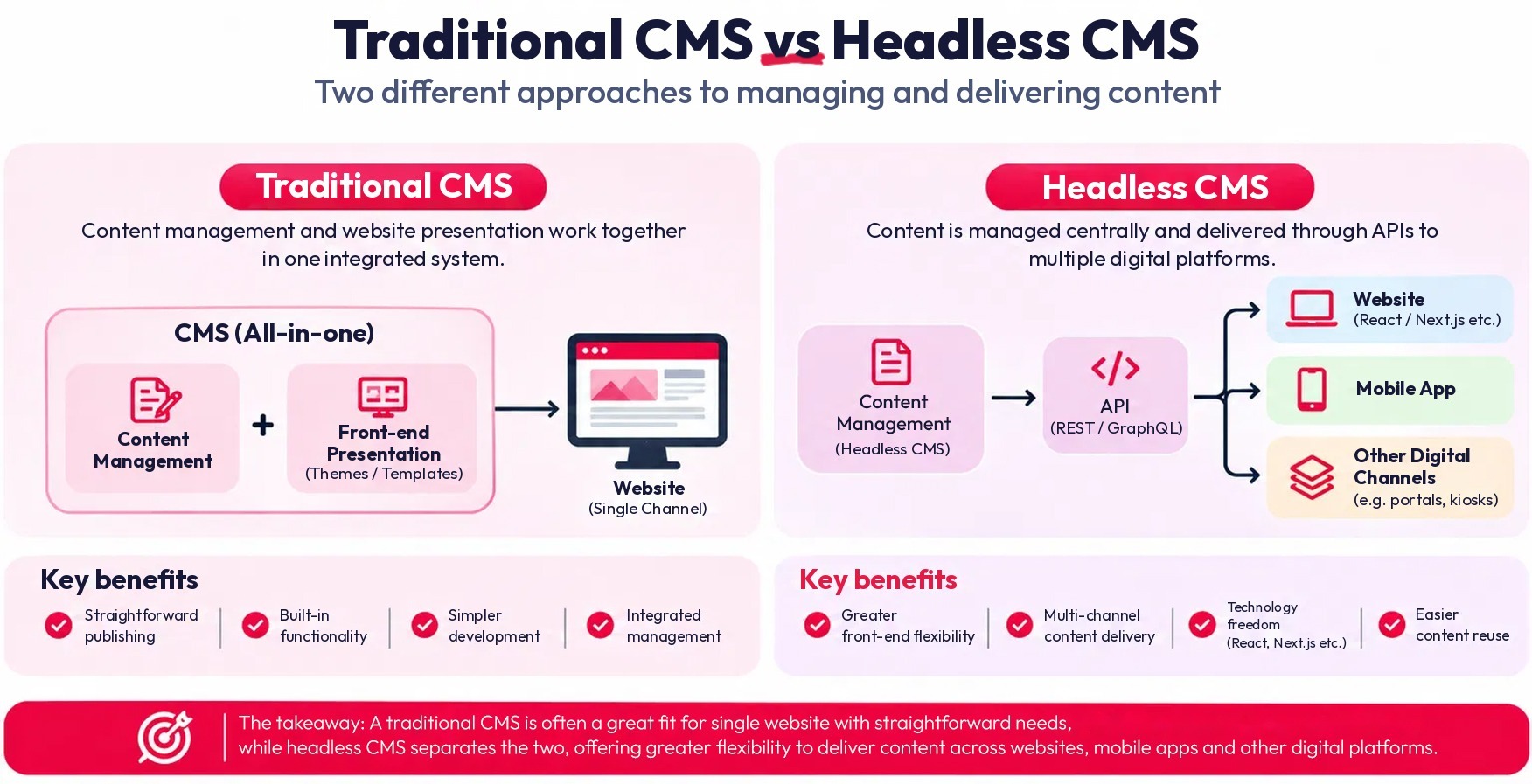
The main distinction is how each system manages content presentation and delivery.
| Comparison | Traditional CMS | Headless CMS |
|---|---|---|
| Architecture | Content and presentation are connected | Content and presentation are separated |
| Content delivery | Built-in templates | APIs |
| Front-end control | Theme or template-based | Independently developed |
| Technology flexibility | Depends on the platform | Supports different front-end technologies |
| Content management | Integrated with website | Managed separately |
| Multiple platforms | May require additional integrations | Designed for multi-channel delivery |
| Initial development | Often simpler | Requires separate front-end development |
| Maintenance | CMS, plugins, themes and hosting | CMS, APIs, front end and hosting |
| Best suited to | Conventional business websites | Custom and multi-channel experiences |
Which Is Better for Business Websites?
A traditional CMS may be more practical when the business needs a conventional website with straightforward publishing requirements. A headless CMS may be more appropriate when content needs to be shared across multiple applications or when developers require greater control over the front end. The decision should be based on the website's purpose, available resources and future requirements rather than technology trends.
React CMS and Next.js: How Do They Work With Headless Architecture?
React is a JavaScript library used to build user interfaces. It is not a CMS itself. However, it can connect to a headless CMS through APIs to retrieve and display website content. This is what businesses generally mean when they search for a React CMS or a CMS with React integration. For example, a business can manage its service pages and articles through a headless CMS while its React application handles the website's design and functionality.
Why Use a CMS With React?
Combining React with a headless CMS can offer several advantages:
- Reusable components: Developers can build common website elements and reuse them across different pages.
- Independent content updates: Editors can update supported content without changing the underlying application.
- Interactive experiences: React supports customised interfaces and dynamic website functionality.
- External integrations: The application can connect with APIs from the CMS and other business systems.
When evaluating a React JS CMS, businesses should check API documentation, authentication, content modelling, developer tools and preview functionality. It is important to understand that the CMS does not need to be built using React. It simply needs to support the integration.
What About Next.js CMS?
Next.js is a React-based framework that provides additional capabilities for routing, rendering and application development. When connected to a headless CMS, it allows developers to build customised websites while keeping content management separate. A Next.js CMS implementation can use different rendering approaches, including static generation and server-side rendering, depending on the website's requirements.
Businesses should consider:
- Whether the CMS supports reliable API integration.
- How editors will preview unpublished content.
- How content updates will be reflected on the website.
- Whether the platform offers suitable documentation and development tools.
- How the complete application will be maintained.
The choice between React and Next.js should depend on the project's technical requirements, not simply on which technology is more popular.
Does Headless Architecture Improve Website Performance?
It can support better performance, but choosing a headless CMS does not automatically make a website faster. Website performance depends on several factors, including front-end code, hosting infrastructure, caching, image optimisation, API response times and rendering methods. A properly developed headless website can use static generation, server-side rendering and content delivery networks (CDNs) to improve content delivery. However, excessive JavaScript, inefficient API requests and poorly configured caching can create performance problems. Businesses should therefore evaluate the complete website architecture rather than assuming that headless development guarantees better loading times.
Headless CMS vs Traditional CMS: What About Development Costs?
Cost is another important consideration when selecting a CMS. Traditional CMS platforms can be less expensive to implement for conventional websites because they provide established templates, publishing tools and extensions.
A headless CMS may require additional investment in front-end development, API integration, hosting and content preview functionality.
| Cost factor | Traditional CMS | Headless CMS |
|---|---|---|
| Initial development | Often simpler | Usually requires more development |
| Customisation | Themes, plugins or custom development | Separate front-end development |
| Integrations | Extensions or custom connectors | API-based integration |
| Maintenance | CMS, themes and plugins | CMS, APIs and front end |
| Future expansion | Depends on architecture | Independent front-end expansion |
The long-term cost also depends on the people and resources required to maintain the platform. A traditional CMS requires regular updates to its core software, themes and plugins. A headless implementation requires maintenance of the CMS, APIs, front-end application and hosting infrastructure. For some businesses, the additional investment in headless development is worthwhile. For others, a traditional CMS may deliver everything they need at a lower overall cost.
When Should a Business Choose a Traditional or Headless CMS?
The right option depends on the organisation's actual requirements.
When a Traditional CMS Makes Sense
A traditional CMS may be suitable when:
- The business operates a single corporate website.
- Marketing teams regularly publish articles and service pages.
- The website uses conventional layouts and templates.
- Technical resources are limited.
- There are no immediate plans for complex multi-channel development.
When a Headless CMS Makes Sense
A headless CMS may be worth considering when:
- Content needs to be shared across websites and applications.
- The business requires a highly customised front end.
- Multiple digital platforms need centrally managed content.
- The website requires extensive API integrations.
- The development team works with React, Next.js or other modern front-end technologies.
One important consideration is whether the business can support the additional development and maintenance responsibilities. Choosing headless architecture simply because it is a newer approach can introduce unnecessary complexity if the website does not need it.
What Should Businesses Consider Before Choosing a CMS?
Before committing to a platform, decision-makers should evaluate more than the initial development requirements.
A CMS should support realistic business plans without introducing technical complexity that the organisation cannot justify.
Can Businesses Migrate From a Traditional CMS to a Headless CMS?
Yes. However, migration involves more than transferring existing pages and images.
A successful migration generally requires:
- Website audit: Review existing content, URLs, plugins, integrations and functionality.
- Content mapping: Organise existing information into suitable content models.
- Platform selection: Choose a headless CMS that supports the project's requirements.
- Front-end development: Build the website using the selected technology.
- API integration: Connect the CMS with the front end and other required applications.
- SEO migration: Preserve important URLs, metadata, canonical tags and internal links. Implement redirects where necessary.
- Testing: Check functionality, mobile responsiveness, content accuracy, accessibility and performance before launch.
For larger websites, a phased migration can help reduce operational risks.
Which Headless CMS Platforms Should Businesses Explore?
Several platforms offer headless content management, but their features, pricing and technical requirements differ.
| Platform | What businesses should know |
|---|---|
| Contentful | Cloud-based content platform with structured content and API-driven delivery. |
| Strapi | Open-source headless CMS offering REST and GraphQL capabilities. |
| Sanity | Structured content management with customisable editing experiences. |
| Storyblok | Headless CMS with visual editing functionality. |
| Drupal | Established CMS supporting traditional, decoupled and headless implementations. |
When comparing platforms, consider content modelling, API capabilities, hosting, security, editorial usability, integrations and ongoing costs. The best platform is not necessarily the most popular one. It is the one that fits the organisation's technical requirements and can be maintained effectively.
How eCare Infoway Approaches Different Website Development Requirements
Different businesses have different website requirements. The development approach should reflect the client's objectives, content management needs and intended functionality rather than applying the same architecture to every project. At eCare Infoway, our website development work involves evaluating these requirements before determining an appropriate technical approach.
Boxall Taxis: An Ongoing Headless Website Development Project
Boxall Taxis is one of our ongoing website development projects, where we are working with a headless architecture. The project involves separating content management from front-end presentation, allowing the website's interface to be developed independently while retrieving content through APIs. This approach provides greater control over the presentation layer and allows the content management system and front end to evolve separately, provided their integration remains compatible. For businesses with specific functionality and development requirements, this separation can offer greater flexibility than relying entirely on a conventional integrated CMS.
The Boxall Taxis website is currently in development, giving our team practical experience in applying headless architecture to a real client project.
Juliette Forster: Website Development Experience
Our work for Juliette Forster provides another example of ECI's website development experience. Every website project requires a balance between design, functionality, content presentation and ongoing management. The development approach needs to support those requirements rather than introduce unnecessary technical complexity. The project reflects the importance of understanding the client's objectives before deciding how a website should be developed and maintained.
Together, these projects demonstrate why CMS decisions should be based on individual business requirements rather than assumptions that one technology works for every organisation.
Final Thoughts: Which CMS Should Your Business Choose?
The choice between a headless CMS and a traditional CMS ultimately depends on what your business expects its website to achieve. Traditional CMS platforms remain practical for conventional websites that need straightforward content management and publishing workflows. Headless CMS platforms offer greater front-end flexibility and can support businesses managing content across multiple digital channels.
For organisations considering React or Next.js, headless architecture can provide a suitable foundation for customised website development. However, the additional development, hosting and maintenance responsibilities should be considered before making the investment. At eCare Infoway, we believe technology decisions should begin with business requirements, not trends. Understanding your current website limitations, future plans and available resources is the first step towards selecting the right solution.